
Access to the HiPay interface
To declare your ultimate beneficial owners or to declare that you do not have any, please sign in to the HiPay interface through the link you have received by email for this purpose.
Click on  or
or  to show or hide sections.
Checking information already provided
Please check the information already filled in for the following sections:
-
Declarant company,
-
Legal representative.
Declaring ultimate beneficial owners
❖ Declaring not having any ultimate beneficial owners
If your company does not have any ultimate beneficial owners, you must declare it by ticking the checkbox displayed for such purpose at the bottom of the declaration, which states the following:
"I, the undersigned, YOUR NAME, declare that on XX/XX/20XX
no ultimate beneficial owners of the DECLARANT COMPANY hold more than 25% of the shares or voting rights of the company. Therefore, there are no ultimate beneficial owners to declare.",
and the legal representative will be considered as the ultimate beneficial owner.
❖ Declaring ultimate beneficial owners
● Declaring the legal representative as an ultimate beneficial owner
1. To do so, set the toggle button to "Is beneficiary", located at the top right of the section header of the legal representative.
2. Then fill in the missing information and check all the fields, making sure that your identification document has been validated by our services.

Also check that you have provided a proof of address issued within the last three months.
3. Declare the legal representative as an ultimate beneficial owner by clicking on the  icon , located at the top right of the section header of the legal representative.
● Declaring an ultimate beneficial owner
- Click on the
 button.
 - Fill in all the fields and upload the required documents, making sure that the identification document is valid and that the proof of address has been issued within the last three months.
- Declare the ultimate beneficial owner by clicking on theicon, located at the top right of the section header.
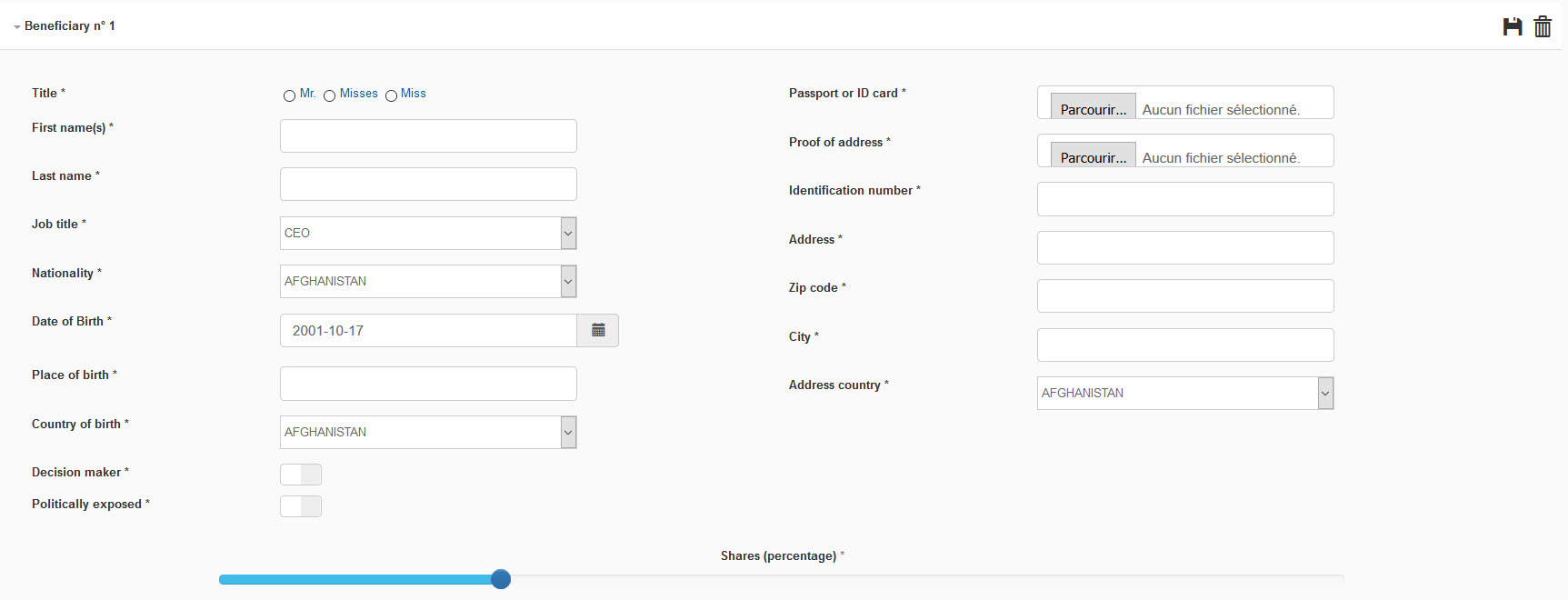
After clicking on theicon:
-
the form switches to "read" mode,
-
a green box indicates that the ultimate beneficial owner has been created,
-
the supporting documents display the status "Waiting".
Submitting the declaration of ultimate beneficial owners
-
After completing and saving all the sections of the declaration, tick the checkbox located at the bottom of the declaration which states the following, depending on your current situation:
"I, the undersigned, YOUR NAME, declare that on XX/XX/20XX
the natural persons mentioned above are the ultimate beneficial owners of the DECLARANT COMPANY."
OR
"I, the undersigned, YOUR NAME, declare that on XX/XX/20XX
no ultimate beneficial owners of the DECLARANT COMPANY hold more than 25% of the shares or voting rights of the company. Therefore, there are no ultimate beneficial owners to declare."
By ticking this checkbox, you certify that the information and documents provided are accurate and complete.
-
Click on "Save".
Make sure that the message "Your declaration has been submitted" is displayed at the top of your declaration.
Checking statuses
The declaration of ultimate beneficial owners includes three status categories:
-
the overall status of the declaration,
-
the status of each ultimate beneficial owner,
-
the status of each document.
The declaration is valid only if:
-
all documents for all ultimate beneficial owners have been validated,
-
all declared ultimate beneficial owners are up to date.
Please note that you must update your declaration after any changes relating to your ultimate beneficial owners.
If a document is rejected, you will be notified by email.
You can check these statuses at all times in the HiPay interface.
❖ Overall status of the declaration
The overall status is displayed at the top of the declaration.
-
A green box indicates when the declaration has been validated.
-
A red box indicates when the declaration has been rejected.
To know why a declaration has been rejected, hover your mouse pointer over the  icon.
icon.
-
A blue box indicates when the declaration has been edited.
❖ Status of an ultimate beneficial owner
Each ultimate beneficial owner is individually verified.
To be valid:
-
filled-in information must be accurate and match the provided supporting documents,
-
supporting documents must be valid.
The status of each ultimate beneficial owner is displayed in the section header of the ultimate beneficial owner in question after the declaration has been submitted.
❖ Status of a document
The status of each document is displayed in the section header of the ultimate beneficial owner in question after the declaration has been submitted.
Each verified document must be valid.
To know why a document has been rejected, hover your mouse pointer over its status.
Making changes to the declaration
❖ Making changes to your declaration before submitting it for validation
- Making changes to an ultimate beneficial owner
To do so, click on the  icon in the section header of the ultimate beneficial owner in question.
- Deleting an ultimate beneficial owner
To do so, click on the  icon in the section header of the ultimate beneficial owner in question.
- Adding an ultimate beneficial owner
To do so, click on the (please refer to "Declaring an ultimate beneficial owner").
❖ Making changes to a validated declaration
Once your declaration has been validated, you can edit it as follows.
1. Click on the icon located next to the "Validated" status.
A pop-up window will prompt you to confirm that you want to switch to "edit" mode, which will invalidate the current declaration.
 Please note that you will not be able to make withdrawals until new validation by our services.
2. Confirm the switch to "edit" mode.
The declaration displays the status "Undergoing modifications".
You can then make changes, delete or add one or several ultimate beneficial owners.
