Passer au contenu
Français - France
  • Il n'y a aucune suggestion car le champ de recherche est vide.

HiPay Enterprise – Making a refund

To make a total or partial refund of a transaction, you can use either our API or the HiPay Enterprise back office.

Please note:

  • refunds can't be made if an operation chargeback was already asked from the customer for this transaction,
  • refunds must be made within 11 months after capture for card transactions. Conditions may differ depending on payment methods.

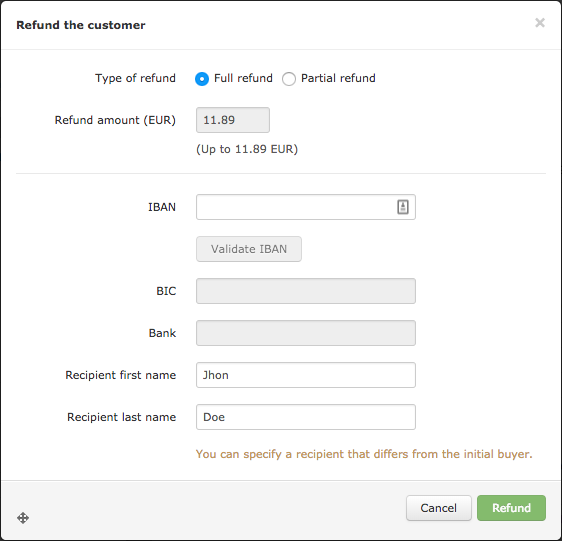
Refund by IBAN option must be activated, please contact your account manager if you are interested.


1. Refunding a transaction through our API

Service endpoints

There are two endpoints (base URLs) to which you can make your API calls:

  • Stage, if you are testing your integration,
  • and Production, when you have finished testing and want your application to go live.
Environment
Endpoint
Stage
https://stage-secure-gateway.hipay-tpp.com/rest/v1/maintenance/transaction/{transaction_reference}
Production
https://secure-gateway.hipay-tpp.com/rest/v1/maintenance/transaction/{transaction_reference}


Format abbreviation
Description
AN
Alphanumeric characters (a-z, A-Z, 0-9)
N
Numeric characters only
R
Decimal number with explicit decimal point, signed


Request parameters

To refund a transaction, you must send the following parameters in your API call.

Field name
Format
Length
HTTP method
Description
Example
transaction_reference
AN
32
GET
HiPay transaction ID to be inserted at the end of the API URL
131256411111
operation
N
32
POST
Set the value: refund
refund
amount
R
-
POST
Amount you want to refund
15.50
operation_id
AN
-
POST
Operation merchant ID. This value will be returned to the merchant with the notifications related to this operation. It can be used, for example, if you make more than one partial refund.
123456
payment_product_parameters
JSON
POST
This parameter is mandatory only to refund Bancontact or SEPA Direct Debit transactions. If an IBAN refund is needed, IBAN information must be sent here.
{"iban":"FR142004XXXX....","issuerName":"client name"}
basket
JSON
POST
This parameter is mandatory only for Oney. Shopping cart details Please refer to "HiPay Enterprise – Payment Gateway – Shopping cart management" technical documentation.
"basket": [     {       "product_category": "8",       "product_reference": "NF-a0351",       "name": "My second product",       "type": "good",       "quantity": 4,       "unit_price": 10.5,       "discount": -2.5,       "tax_rate": "20",       "total_amount": 39.5     }   ]


Transaction statuses sent by server-to-server notification

Status
Message
Description
124
Refund Requested
A refund request has been sent to the financial institution.
125
Refunded
The payment was refunded. A payment reaches the “Refunded” status when the financial institution has processed the refund and the amount has been transferred to the customer’s account. The amount will be deducted from the next total amount to be paid out to the merchant.
126
Partially Refunded
The payment was partially refunded.
165
Refund Refused
The refund operation was refused by the financial institution.


To consider a refund made, it is mandatory to handle server-to-server notifications, specifically with the "status" field with the following values:

Value
Description
125
Refunded
126
Partially refunded


2. Refunding a transaction in our back office

In the HiPay Enterprise back office, search for the captured transaction you want to refund.

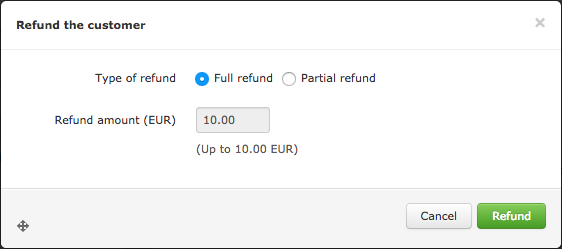
From the Transaction Preview, click on refund_button.jpg, then choose if you want to make a full or partial refund (for partial refunds, specify the amount) and click on refund_vert.jpg.


Classic refund

normal_refund.png


Refund by IBAN

iban_refund.png