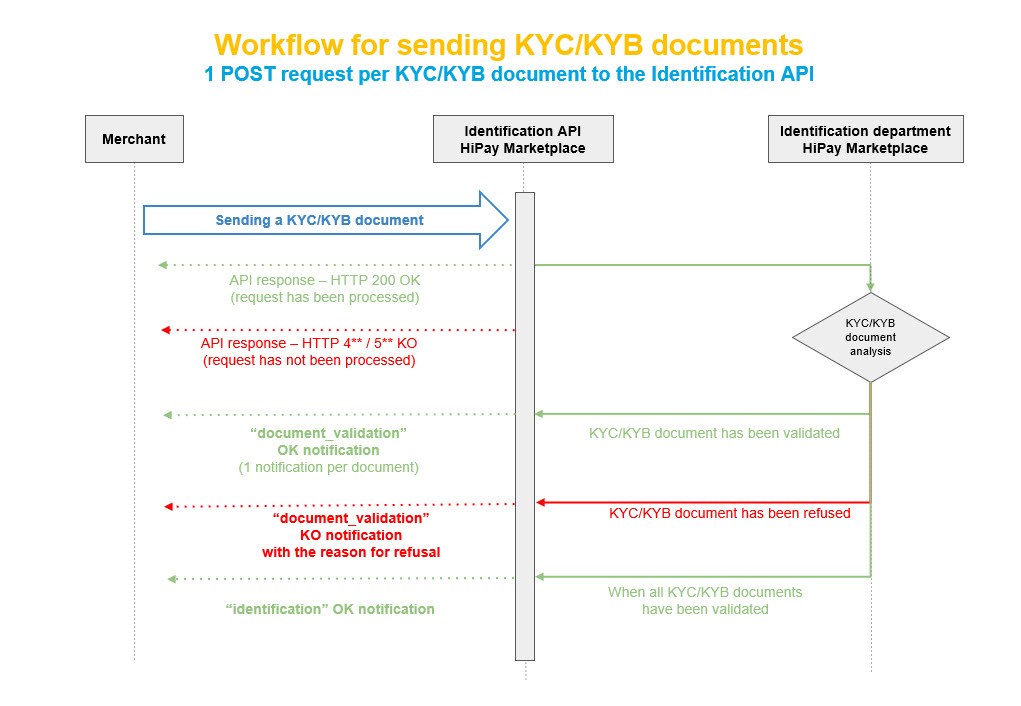
Using the Identification API
KYC/KYB documents must be sent separately (not in one single file) through POST requests to the Identification API:
https://professional.hipay.com/api/identification.{_format}
The following parameters are mandatory:
- type (type of KYC/KYB document)
- file (document to be uploaded in electronic format)
- php-auth-subaccount-id (ID of the account to be identified)
You will find on our Developer Portal a specific technical documentation with all the necessary information to upload KYC/KYB documents using this web service.
 To update KYC/KYB documents, please submit a request through our Support Center.
Accepted formats for KYC/KYB documents
Each KYC/KYB document must be sent in JPEG, JPG, GIF, PDF or PNG format, with a 15 MB maximum file size.
API live testing
https://developer.hipay.com/doc-api/marketplace/api/#!/identification/post_Identification